
Draw It Your Way: AI Renderings for SysML v2 Views
SysML v2 views are usually associated with one thing: views in the standard graphical notation. That is the common case, but it is not what the view concept is limited to.
A view in SysML v2 selects model elements (expose and filter) and hands them to a rendering. The rendering decides the format. The standard library ships renderings such as asTreeDiagram, asInterconnectionDiagram, or asElementTable, but nothing stops you from defining your own. The renderer is responsible for what comes out.
In this post, I define a rendering whose renderer is an AI assistant. The view says what to show, and a prompt in the rendering says how to draw it.
The model: a few delivery drone use cases
The example is deliberately oversimplified. It contains three use case definitions with their subject and actors. Everything else, such as objectives, actions, or requirements, is left out.
package DeliveryDroneUseCases {
    part def <SoI> DeliveryDroneSystem;
    use case def DeliverPackage {
        subject droneSystem : SoI;
        actor operator;
        actor client;
        actor environment;
    }
    use case def ChargeDrone {
        subject droneSystem : SoI;
        actor operator;
        actor energySupply;
    }
    use case def BookDelivery {
        subject droneSystem : SoI;
        actor operator;
        actor client;
    }
}
“Where are my ellipses?”
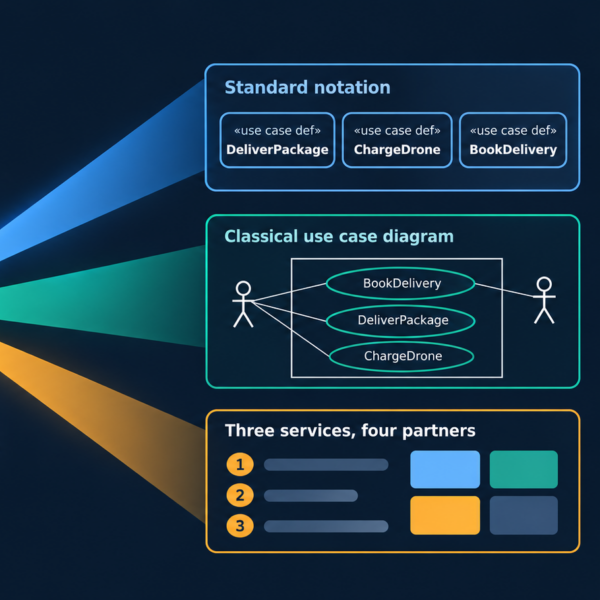
Some people complain about the standard SysML v2 graphical notation for use cases. The ellipse is gone. The use cases are no longer enclosed by a boundary box representing the subject. Stick figures for actors are still allowed, but rarely supported by tools.
There are good reasons for the standard notation. But if your readers expect the classical picture, you do not have to wait for a tool vendor. Build your own diagram.
Build your own diagram
This is the complete view usage:
view deliveryDroneUseCasesView : AIViews::AIUseCaseView {
    expose DeliveryDroneUseCases::*;
}
It exposes the content of the package. The view definition filters it down to use case definitions and renders the result with AI. This is what comes out:

Stick figures, ellipses, and a subject boundary box: a classical use case diagram, generated from a three-line view. Pretty cool, isn’t it?
The library behind it
The magic is a small library with three elements. AIRendering specializes Views::Rendering and adds a create_prompt attribute. asAIGenerated is a default rendering usage of that definition, subsetting Views::renderings. The view definition AIUseCaseView filters for use case definitions and redefines the prompt to describe the classical notation.
package AIViews {
    doc /* Views and renderings whose graphical representation is generated by an AI assistant.
         * The rendering carries a natural-language prompt that tells the AI how to draw the
         * elements exposed and filtered by the view.
         */

    view def AIUseCaseView {
        doc /* Classical use case view. Shows the use case definitions exposed by the view,
             * together with their subjects and actors, as an AI-generated diagram.
             */
        filter @SysML::UseCaseDefinition;
        render asAIGenerated {
            doc /* Renders the view with AI, using a traditional use case notation. */
            :>> create_prompt = "Create a classical use case view showing the use cases exposed and filtered of the view in a traditional use case representation with stick figures for the actors, ellipse for the use case, and a boundary box around the use case for the subject.";
        }
    }
    rendering def AIRendering :> Views::Rendering {
        doc /* Rendering that is produced by an AI assistant instead of a fixed notation. */
        attribute create_prompt : ScalarValues::String {
            doc /* Instruction given to the AI describing how the view is to be rendered. */
        }
    }
    rendering asAIGenerated : AIRendering[1] :> Views::renderings {
        doc /* Default AI rendering. Views redefine its create_prompt to describe their specific notation. */
    }
}
The split matters. The view (expose and filter) defines the content deterministically from the model. Only the presentation is delegated to the AI. The prompt is part of the model, versioned and reviewable like any other element.
Views for the reader, not for the modeler
With this approach, you can easily create views optimized for the readers of the information. For example, a one-slide summary for managers. The same model elements, another view definition, another rendering:
view def AIUseCase4ManagersView {
    filter @SysML::UseCaseDefinition;
    render as4Managers;
}

rendering as4Managers : AIRendering[1] :> Views::renderings {
    doc /* AI rendering as a single management slide. */
    :>> create_prompt = "Create a single presentation slide for managers summarizing the use cases exposed and filtered by the view: what the system does, who is involved in which use case, and what this means for decisions. No modeling notation.";
}

view deliveryDroneUseCaseSlide : AIViews::AIUseCase4ManagersView {
    expose DeliveryDroneUseCases::*;
}
The result:

No modeling notation, but still a view on the model. The slide names its source: the system model.
A word of caution: the AI does more than draw. In the slide, it adds interpretations such as “treat permits and flight limits as a top risk”. That is not in the model. For a classical diagram, the rendering is close to the model. For a management summary, review the result before you present it. The model remains the single source of truth. SysML v2 also provides the modeling of risks. So, the risks can also be “real” information from the model.
It all starts with the model
AI renderings are only as good as the model behind them. The foundation is a solid model built on a solid methodology, such as SYSMOD. A clear subject, well-defined actors, and meaningful use cases make every view better, AI-generated or not.
Would you like to be kickstarted on your SysML v2 journey? Whether you start from document land, from SysML v1 land, or from wherever you are, contact me. As an MBSE consultant and trainer at oose, I’m happy to help. MBSE4U forwards all training and consulting requests to oose.
This blog post is based on the blog post by MBSE4U: https://mbse4u.com/2026/10/08/draw-it-your-way-ai-renderings-for-sysml-v2-views/
Tag:Views
